Cannot download with plugin, only PMP

haukke

Creator
Pronouns
she/her
I have tried following the setup instruction for Ublock Origin, but because only lite is available for Chrome now, the Block Outsider Intrusion into LAN filter and My Filters tab seem to have been either renamed or removed. This stays the same regardless of what filtering mode I choose, and when reloading a page I can see the download w/ plugin button flash briefly before being replaced with the PMP one.
 
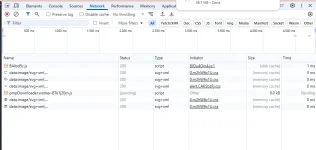
Most likely something blocking your requests. Would need to see what the network requests look like after an attempt. Press F12 and click on the Network tab, then post a screenshot of that after trying and install.
 
1757202544158.webp
If you mean after clicking the plugin download button, it goes away after a fraction of a second, so I unfortunately cannot get the network tab for using that. This is with the pmp button, though.
 
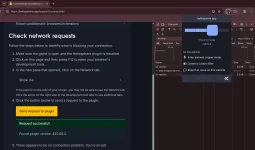
Ah, yeah, it's kind of hard to test now with the PMP fallback. I'm gonna make a page for troubleshooting it, and then I'll get back to you with it!
 
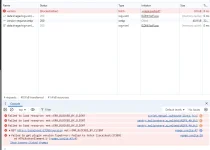
uBlock Origin Lite does not block the requests to localhost in my testing. We can see that the error is BLOCKED_BY_CLIENT, so some extension is blocking it. Vanilla Ungoogled Chromium does not block the requests for me. I suppose it's possible Google Chrome could, but I doubt it. I would turn off extensions one-by-one until you isolate which one is blocking, then figure out how to add an exemption.

If you find out what extension it is, let me know, and I'll add it to the list.
 
Default settings uBlock Origin Lite does not block it.
1757302244875.webp

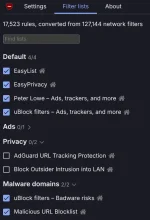
These are the only checked lists by default. Do you have anything else checked?
1757302324443.webp
 
Back
Top