
Rebel Scum
New member
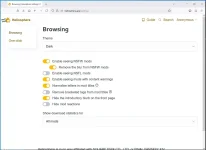
If I set the website to dark theme, it stays in that theme only as long as I leave the tab open. If I close the tab and open Heliosphere in a new tab, it reverts to the system theme. If I then go into settings, the setting is still set to dark but I have to set it to something else and then back to dark to make it actually show the theme properly.
The cause of this appears to be a missing data-theme="dark" attribute on the root html element that's not being added when the page loads. When I change the setting it gets added then, and likewise if I change it back to system it gets removed. And if I manually edit it out the website instantly reverts to system theme too.
For reference in case it matters, I'm on Firefox v140.0.2 which is the latest version at the time of writing this post.
The cause of this appears to be a missing data-theme="dark" attribute on the root html element that's not being added when the page loads. When I change the setting it gets added then, and likewise if I change it back to system it gets removed. And if I manually edit it out the website instantly reverts to system theme too.
For reference in case it matters, I'm on Firefox v140.0.2 which is the latest version at the time of writing this post.