
hi. hello. i'm back in the building again.

credits
credits for lux+ redux are as follows:- bizu, tsar, illydoesthings: bibo+
- spiswel, lady strella: bibo trans redux
- korbo, arcess: better pube framework
- hafrunmods: lux+

full developer breakdown
for ease, the devkit is a single zip file, found on the mod page under 'extra files' (right on top of the description). those files are:- textures, which encompass all the loose skin element files used in lux+ redux;
- blender devkit, which. should speak for itself.
textures
this is the raw skin textures, including redux and flat chest overlay files. do note that hrothgar textures are saved in DDS format. for those unaware, bibo textures are utilized with the same base texture across most races - AKA, highlander and viera use the midlander textures. if it is not saved as a separate texture it is on purpose, use midlander. the undergarment textures have also been included for those wanting to build their own devkits.
if you want to use a tattoo while maintaining redux/flat chest textures, this guide will show you how to use the overlays in penumbra. if you need to use both, apply the flat chest textures FIRST, THEN apply the redux textures!
blender devkit
upon opening the devkit, you will be greeted to this. (please do not mind that i use a custom UI reskin.)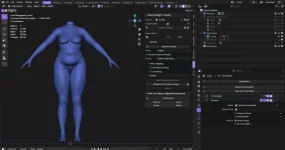
the devkit is structured like so:
- Armature
- Armature (Animation)
- Armature (T-Pose)
- Individual Body Meshes
- Chest
- (All Chest Shapekeys)
- Flat
- S/M/L
- Triangulated S/M/L Chest
- Triangulated S/M/L Chest [YAS]
- Quad S/M/L Chest
- S/M/L (Pushup)
- Triangulated Push-Up Chest
- Triangulated Push-Up Chest [YAS]
- Quad Push-Up Chest
- Lower Body
- Labia
- BPF (Labia)
- Triangulated Labia
- Triangulated Labia [YAS]
- Quad Labia
- Penis
- (All Penis Shapekeys)
- (Penis Garment Tuck)
- Flaccid
- BPF (Flaccid)
- Triangulated Tuck
- Triangulated Tuck [YAS]
- Quad Tuck
- Erect
- BPF (Erect)
- Triangulated Erect
- Triangulated Erect [YAS]
- Quad Erect
- Labia
- Hands
- Feet
- Chest
- Mannequins
- [YAS Weight Data; Advanced Users Only!] (seriously, most of the devkit hinges on these meshes - you can move them, but do not edit them unless you know what you're doing)
- (Labia)
- (Penis)
- Workspace (This is where your mods go!)
armatures
by default, all meshes are parented to Animation Armature. this will allow you to test your weights in blender with the given set of animations. when animation testing, disable all individual meshes (do not hide them, disable them! the little checkbox next to the eye icon!) and use the mannequins to test for clipping. this will drastically improve your computer’s ability to render the animations at a respectable framerate, even with the game running. a T-Pose Armature has also been included to help and sculpt around underarm weights. this devkit is built around the robust weight transfer (SENT), XIV breast slider, and bustomize extensions, to make the whole process of porting to lux+ redux as painless as possible. while not formally supported, lux+ redux should also play nicely enough with Yet Another Addon, and is useful for making sure all meshes are correctly ordered, attributes/materials are properly assigned, and other quality of life features.individual body meshes
a big change made in 2.1 is that now the mannequins control nearly all YAS weights throughout the devkit via the YAS Weights modifier. penis waists (and shapekeys) are controlled by the penis mannequin; all other devkit weights and shapekeys are controlled by the labia mannequin. each individual quad mesh has their weight transfer mannequin appropriately named. pre-triangulated meshes for shapekey use have been better separated and are easier to enable/disable when needed. in layman's terms, press this button on the mannequin to toggle YAS weights on most individual meshes: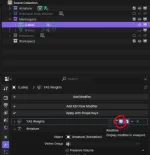
pre-triangulated YAS meshes with shapekeys will not be toggled by this modifier as their weights are already applied.
when weighing to lux+ redux, especially if you're intending to work with YAS, please use robust weight transfer. it will help you and is invaluable to you. use the source dropdown in its menu to locate the YAS mannequins, like so:
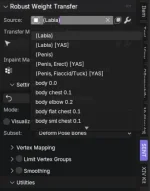
do note that the penis YAS models are only of the waist. this was done to save space in the devkit and lower the potential of incorrect weights in other areas. if you're porting something to YAS, you will need to weigh it to the labia YAS mannequin first. you will also need to utilize robust weight transfer's masking option. weighing to YAS for penis models should look like this:
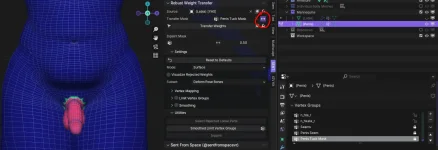
take note of the settings in robust weight transfer - we are telling it to transfer weights to all areas except what is masked by the weights of the current vertex group. that's what that little <-> is for. you will need to make this key for your garments of choice, or you can transfer the key from the bulge underwear. what you name it doesn't matter.
the weight order is:
- weigh to the corresponding penis (YAS) mannequin first, without a mask
- weigh to the labia (YAS) mannequin for all other leg weights, using the mask you made with the invert <-> toggle checked
"this is very complicated" i'm holding your hands. all things are when you do them the first time. they will get easier as you get more comfortable, i promise.
this devkit utilizes and heavily relies on shapekeys, both in blender and in-game. in blender, the mannequins control all shapekey deformations for all meshes. as an example, if i am looking to model something specifically for the flat chest option, setting the flat chest shapekey to 1 on the labia mannequin will set every applicable mesh with the key to 1 as well. the penis mannequin handles penis deformation options only. all other shapekeys deformations pull from the labia mannequin. i've finally written a guide on shapekeys in the context of modding, and you can find that here.
in-game, lux+ redux takes advantage of a newer penumbra feature called custom shapekeys (SHPX). this allows modders to hook into the same logic the game calculates for glove and boot compatibility to load specific shapes based on metadata parameters. lux+ redux has its own setup for the custom keys it uses, to future-proof any other body mods made using a similar framework. while your upscales do not have to follow this ruleset (and depending on what/how much you want to do, may even be more hassle than its worth), i am outlining it here for modders who want to take advantage of the doors that have opened with it.
shapekeys FOR THE NSFW CHEST is as follows:
- shpx_lux_flat (upscale use only)
- shpx_lux_small
- shpx_lux_med (upscale use only)
- shpx_lux_large
flat is typically its own size, while medium is the default shapekey for S/M/L.
shapekeys FOR THE NSFW LEGS* is as follows:
- shpx_lux_gena
- shpx_lux_genb
- shpx_lux_genc
- shpx_lux_gend
this process allows you to have multiple upscales/reshapes bound to one or two files rather than four or more. ALL shapekeys on every individual mesh that utilizes these come pre-named, so you do not need to change them unless you intend to add your own. you will need to hook your custom shapekeys through penumbra's meta manipulations tab, like so:

be sure to be specific about what equipment you're pointing to; it matters! this part of the process is something that can only be done in penumbra - while textools can read these values for importing and exporting raw model data, it does not have the UI to change or add them! if you regularly work with models over 30k tris, this method likely will not work for you.
everything in this devkit can be exported to penumbra or to textools, whichever program you prefer for authoring. if you plan to utilize these shapekeys, regardless of file export type, use the pre-triangulated meshes.
these are the appropriate FBX settings for TEXTOOLS:
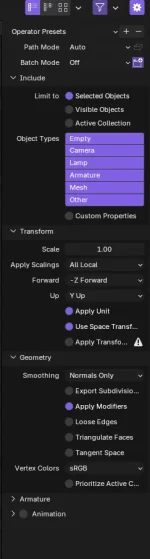
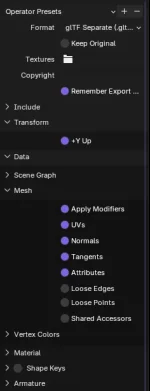
these are the appropriate GLTF/GLB settings for PENUMBRA:
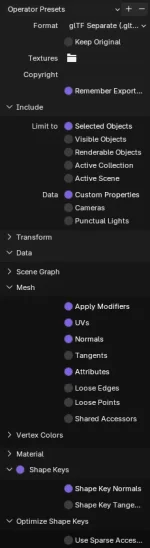
(typically tangents should be turned on, but if your import does not have correct shading on the seam areas or if shapekeys fail to register, turn it off. i have it off in this preview for this reason. for a more in-depth breakdown on why this can occur, see the penumbra wiki.)
i do not recommend exporting for penumbra if you intend to use YAS. right now there are serious discrepancies between textools and penumbra imports with YAS that would require the penumbra dev team to fix, and i don't have an ETA on that. using Yet Another Addon for FBX exports is completely fine.
i hope you enjoy! thank you for reading, and happy modding.
if you are unsure about anything, please feel free to ask here or DM me.Attachments
Last edited:


